
Depicting Venice-Turning Photographs into Paintings
Depicting Venice-Turning Photographs into Paintings. Create beautiful Venetian artwork in seconds, using Firefly AI software in Photoshop.
Firefly is Adobe’s generative AI technology, built directly into Photoshop. Firefly transforms Photoshop from a traditional image editor into an AI-assisted creative studio, allowing users to generate, extend, replace, and edit image content using simple text prompts; while retaining Photoshop’s professional layer-based workflow. It is designed to speed up repetitive editing tasks, while giving artists and designers creative control.
I’ve always admired Venice’s two remarkable periods of art – the Venetian School of the 15th and 16th centuries, and the rich artistic scene of the 18th century. Since first visiting in the mid-1970s, I’ve built my own collection of “Grand Views,” inspired by works popularized by artists through the ages.
The Molo and the views across the San Marco Basin have changed a lot since my first visit in the 1970s. My goal was simple – to explore whether this software could create artwork that captured some of the essence of this iconic scene, which has inspired artists for centuries.
For this experiment, only Firefly’s “Generative Fill” tool was used, paired with very simple command prompts. No additional processing was done in Photoshop, allowing for a direct comparison of the results. I was both surprised and fascinated by the initial outcomes – it’s fun, quite addictive, and adds a whole new dimension to photography. See and judge for yourself! Maybe my first venture into AI regeneration software, will inspire you to give it a try.
AI-Generated photography is becoming commonplace – this post usefully dives into the ethical concerns and frameworks surrounding the use of AI in photography. As AI continues to advance, these frameworks will likely focus even more on transparency, disclosure, provenance, verification, and accountability to maintain trust in what we see and believe. It also includes details about Firefly AI software and a summary of its main features.
- Introduction
- Direct Comparison of Original Photographs and Generative Imagery.
- Photography and Artificial Intelligence – Distinctions between truthful visual documentation and creative image generation.
- What is Firefly AI software? – Getting started – Credit Plans – Summary of the key features of it’s image processing software.
- Links (internal–External)
Introduction
This post, explores my initial delve into turning my photographic images into painterly artwork, using Firefly AI generative software.
For around 50 years, I’ve taken many short trips to photograph Venice, mostly in the winter. As one of the most photographed cities in the world, the real challenge is figuring out how to create images that feel individual and truly capture the spirit of the place. In the “Links Section” below, you’ll find a variety of my photographic posts aimed at inspiring this approach.
A big goal of this site, is to help people shift from simply ‘looking’ to genuinely ‘seeing,’ encouraging a more personal and thoughtful perspective. Shooting in Venice means being quick to adapt to changing weather, and navigating the daily crowds that pour into its historic heart. I see photography as the art of “making visible” – raising your awareness to notice what others might miss, and embracing the idea that sometimes less is more for imagination.
I aim for photos that are well-composed and clearly communicate their intent. Long before the digital era, the goal was to get everything right in-camera, and before upsampling technology, using the full frame was essential for a quality print. For me, that principle still holds true and will never change.
I had never felt inclined to use any AI generative software in my photographic work – until just a few days before publishing this article!
I’ve long been an admirer of two remarkable periods of art: the “Venetian School of Art” from the 15th-16th centuries and the 18th century. Over the years, I’ve built my own collection of “Grand Views of Venice,” inspired by the masterpieces of these eras. The Molo and the view across the basin have changed greatly since the 1970s, when I first visited Venice. I wondered if this software could help me create artwork, that captures some of the atmosphere and essence, that once inspired the great artists of the past.
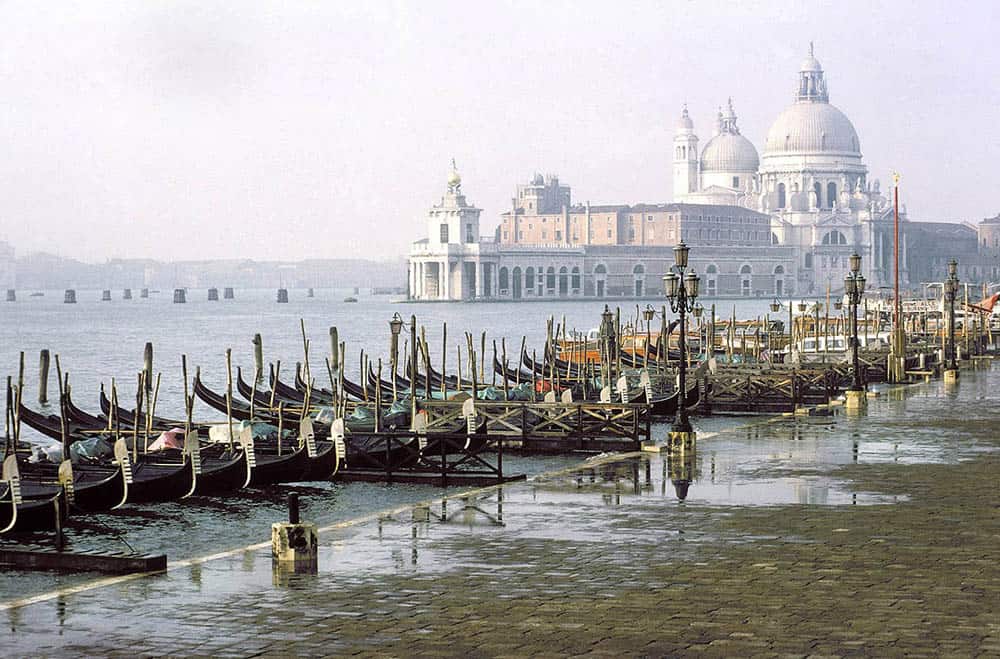 Curiosity got the better of me. I clicked on Firefly and loaded my first “Grand View” image, from the mid 1970s, scanned from a Kodachrome transparency. The Molo and the view across the basin have certainly changed since then.
Loaded into Firefly, I typed the command prompt: “turn this into a painting“, pressed a button and waited for the result. In about 20 seconds, my painting appeared. Not bad, but the sky was weak and lacked texture. I repeated the process, with the command “give slightly more texture to the sky area“. Below is the result – I was rather surprised!
Photo above. Kodachrome colour transparency (c.1975), scanned into digital format. A “Classic View from the Molo across to the Salute“.

AI Painting. I think my first AI transformation was a fair success with just two attempts – it relives my memories of my first trip to Venice, and captures this famous “Grand View” in a reasonably painterly and timeless fashion. The painting looks nicely balanced. My commands were in the first attempt – “turn this into a painting” and for the second – “slightly increase the texture in the sky area”.
Photography and AI-Depicting Venice-Photographs into Paintings
This section explores some thoughts on the differences between authentic visual documentation and imaginative image creation.
The rise of artificial intelligence in photography, represents one of the most significant transformations in the history of visual culture. Tools such as Adobe Firefly, now integrated directly into Photoshop, allow users to generate, remove, replace, or extend image content using simple text prompts. Features such as Generative Fill and Generative Expand, can create highly realistic visual elements that blend seamlessly with existing photographs, drastically reducing the time required for tasks that once demanded advanced editing skills. What previously required painstaking selection, cloning, masking, and compositing can now be accomplished in seconds through AI-assisted workflows.
These developments have sparked an important debate about the nature of photography itself. Traditionally, photography has been valued for its relationship to reality. A photograph was understood to be the result of light striking a camera sensor or film at a particular place and time. Although photographers have always exercised creative judgement through composition, timing, cropping, and darkroom techniques, there remained an assumption that the scene being photographed genuinely existed. AI challenges this assumption, because it allows photographers and designers to create convincing visual elements that were never present before the lens.
Has photography ever been entirely objective? From dodging and burning in the darkroom to extensive digital retouching in Photoshop, images have long been subject to manipulation. Viewed from this perspective, AI is not a complete break from photographic tradition, but rather the latest and most powerful tool in a long history of image enhancement. The distinction increasingly lies between photography as a record of reality and image-making as an act of creative construction.
Authentic documentation from synthetic content. Nowhere is this distinction more important than in photojournalism. Journalism depends upon public trust, and photographs have historically served as evidence of real events. AI offers practical benefits for news organisations, such as automating image organisation, cataloguing, and restoration. However, it also introduces significant risks. AI-generated or AI-modified images can create misinformation and make it difficult for audiences to distinguish authentic documentation from synthetic content. As a result, many news organisations prohibit the use of generative AI to alter the factual content of news photographs. The core challenge is no longer whether an image looks real, but whether it can be trusted as an accurate representation of an actual event.

Courts typically verify photographic authenticity through several methods. Witnesses may testify that an image accurately represents what they observed. Investigators examine the chain of custody to determine who captured, stored, and handled the image. Metadata can provide information about the time, date, location, and camera used. Digital forensic experts may analyse files for signs of manipulation, inconsistencies, or unusual editing patterns. Most importantly, photographs are frequently corroborated by other forms of evidence, including witness testimony, CCTV footage, documents, location records, and other photographs. Photo Left. Another mid 1970s Kodachrome colour tranparency film image. Trying to hold the shadow detail was a problem in those analogue days.

AI Painting. A “Classic View from the Molo towards San Giorgio di Maggiore“. My command in this AI conversion was – “turn this into an Impressionistic painting”. The setting sun reflected in the acqua alta, plus the splashing water, add a real sense of life into the picture. Starting to get quite excited – it’s a good and rather beautiful impression of the scene!
Provenance and verification rather than appearance alone. AI has therefore shifted the legal question from “Does this photograph appear genuine?” to “Can we demonstrate that this image originated from a real-world event and remained unaltered?”
In response to these challenges, a number of ethical principles have emerged for the responsible use of AI. Across journalism, photography, technology, and public institutions, there is broad agreement on several core values: transparency, accuracy, accountability, fairness, privacy, and authenticity. Individuals and organisations are encouraged to disclose when AI has been used, verify AI-generated outputs, maintain human oversight, avoid misleading audiences, and respect privacy and intellectual property rights. In journalism and documentary photography, these principles are especially strict because public trust depends on the integrity of visual evidence.

An erosion of confidence? An additional concern arising from AI is the phenomenon sometimes called the “liar’s dividend.” As synthetic images become more convincing, people may begin dismissing genuine photographs as fake. Ironically, AI threatens not only trust in false images but also trust in authentic ones. This erosion of confidence may be one of the most profound consequences of the technology.
Photo Left. Another 1970s image. Taken in mid-winter just before sunset – an atmospheric image and looks good in sepia-toned monochrome.
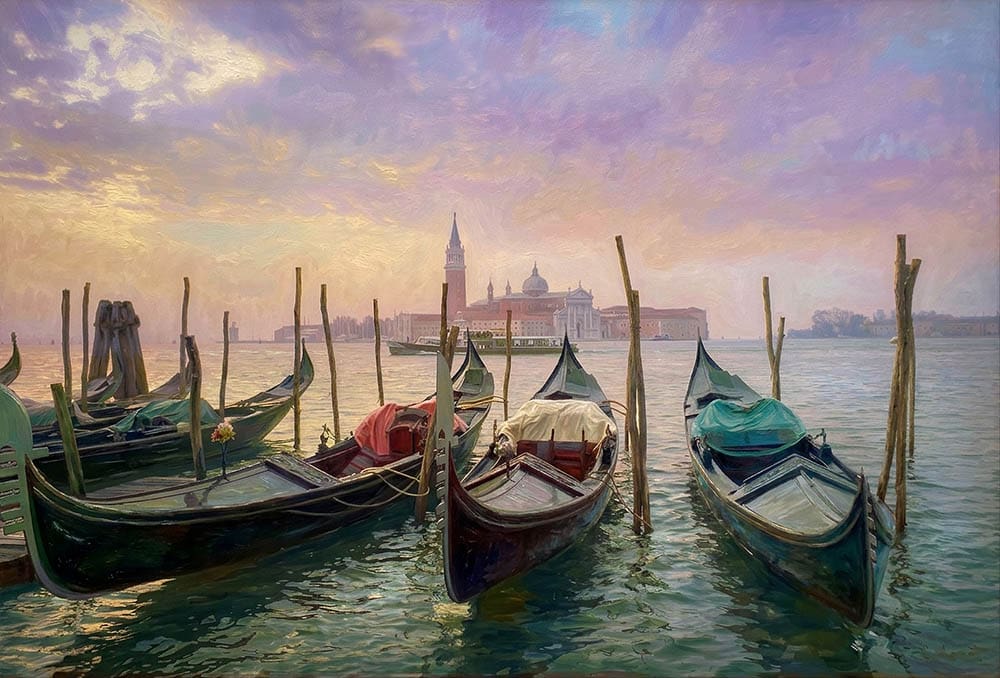
AI Painting. Another version of the “Classic View from the Molo towards San Giorgio di Maggiore” My command in this AI conversion was – “turn this into a painting”. A first time hit! It’s interesting how the AI conversion, picks up and amplifies the subtle colour in the sky and also puts much more detail and life into the shadow details. One can almost imagine the gondolas moving withe lapping water, and captures the quality of light that’s so iconic of Venice.
Depicting Venice-Turning Photographs into Paintings Depicting Venice-Turning Photographs into Paintings
Ultimately, AI does not discredit photography, nor does it eliminate the value of the photographer. Instead, it forces society to rethink what photography means. The unique qualities of photography, being physically present, observing the world, recognising a significant moment, and recording reality as it unfolds; remain distinct from AI-generated image creation. As synthetic imagery becomes commonplace, genuine photographs may derive even greater value from their ability to document real people, places, and events.
The future of photography? It lies not in rejecting AI, but in maintaining clear distinctions between creative image generation and truthful visual documentation.
Ethical guidelines evolve with AI in much the same way that professional ethics have evolved in response to previous technological revolutions. New technologies create new possibilities, new risks, and previously unimagined forms of harm. Ethics develops to address those changes.
In photography, earlier ethical codes focused largely on issues such as privacy, consent, image manipulation, and truthful representation. The arrival of digital editing prompted the development of rules governing Photoshop alterations. AI, however, introduces challenges that go further. It enables the creation of entirely synthetic images, realistic deepfakes, and automated content generation at a scale previously impossible.
Ultimately, ethical guidelines do not evolve by abandoning existing values. Rather, they extend long-standing principles such as honesty, accountability, fairness, and respect for persons into new technological environments. The fundamental questions remain remarkably consistent:
- Is the content truthful?
- Could it mislead others?
- Who is responsible for it?
- Are people being treated fairly and respectfully?
- Does it serve the public interest?
Developing Guidelines. They vary enormously, because different industries value different things. The key question is usually: Is the image primarily evidence, information, art, or marketing? The closer an image is to being evidence, the stricter the rules tend to be.
Across most industries, the dividing line is becoming less about whether AI was used, and more about whether the audience is misled.
A simple framework might be: Industry versus AI – Generation Tolerance:
- Journalism – Very low
- Documentary – LowScience/Medicine – Very low
- Legal/Forensics – Very low
- Commercial Advertising – High
- Fashion -High
- Fine Art – Very high
- Entertainment – Very high
Emerging Industry Trends. Across the industry, stock agencies are moving toward three forms of disclosure:
1. AI-generated – The image was created wholly or predominantly by an AI system.
2. AI-assisted or AI-edited – A photograph exists as the base image, but AI tools contributed significant alterations or additions.
3. Traditional photography – Images captured by a camera without substantial generative AI intervention.

Summary. AI changes the tools, but the underlying ethical concerns remain rooted in trust, integrity, and human responsibility. As AI becomes more capable, ethical frameworks will likely place even greater emphasis on transparency/disclosure, provenance, verification, and accountability to preserve confidence in what we see and believe.
Photo Left. This time a more recent digital image, taken just before sunset in Winter.
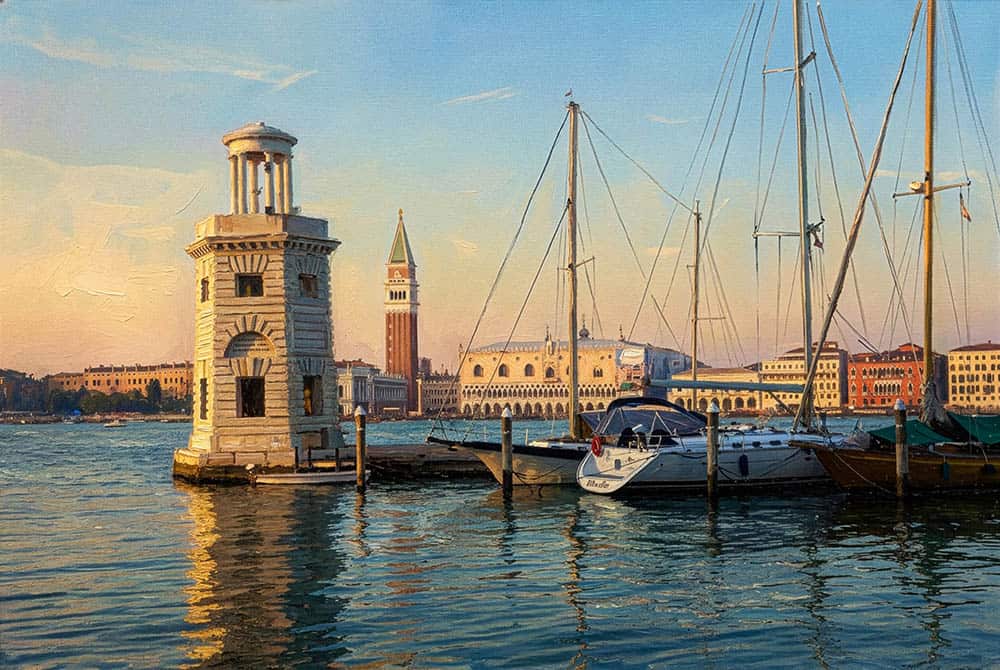
AI Painting. “View from the Piazza on San Giorgio di Maggiore towards San Marco“. My command was simply “Turn this into a painting”. Taken at Xmas, it picked up the late afternoon light and the rippled water beautifully. My tip at that time, would be to get to the Molo by around 4pm, ready for the sunset, behind La Salute. Alternatively, make it to the Academy bridge, looking towards the southern entrance to the Grand Canal, with Salute to the right.
Photoshop and Firefly AI software Depicting Venice-Turning Photographs into Paintings
Getting started. The first time I used Adobe Firefly in Photoshop, (1st Sept 2026), there were enough free credits to process three of my jpeg images of 1000 pixel width, copied from my website galleries. However, when you have run out of generative AI credits, you can purchase additional credits in two ways: 1. Upgrade to a higher Firefly plan. 2. Buy additional generative credit packs through your Adobe account. Adobe provides an “Add Generative Credits” option for eligible accounts.
If you only use Generative Fill, Generative Expand, and image creation occasionally, the Standard ( £7.89 / $9.99/month) plan is usually sufficient. If you’re creating lots of images daily or using Firefly video features, Pro or Pro Plus tends to offer much better value before you need to buy extra credits. You can compare the latest plans and purchase options directly Adobe Firefly plans (current published pricing Sept 2026)
Plan Monthly Price Generative Credits (Sept 2026)
Firefly Standard US$9.99/month 2,000 credits/month – Standard: 2,000 monthly credits and access to Firefly’s image, video, and audio generation features.
Firefly Pro US$19.99/month 4,000 credits/month – 4,000 monthly credits, higher video/audio allowances, and additional Adobe app benefits including Photoshop on web and mobile.
Firefly Pro Plus US$49.99/month 10,000 credits/month – 10,000 monthly credits aimed at heavier video and AI-generation workloads.
Firefly Premium US$199.99/month 50,000 credits/month – : 50,000 monthly credits and the highest allowances for video, audio, and premium AI models.
Warning. Each generative task appears to use 20 credits, and you may well use several generative cycles to get the image to your satisfaction – so, put this into consideration when choosing the various plans on offer. The software is addictive! Upsamping is free and seems to improve the image quality, especially sharpness. In the Links section below, you can investigate alternative free software. However, I have not tried them out.
Introduced into Photoshop, here is a basic explanation of what is Firefly AI software and a summary of its key features of it’s image processing software.
Adobe Firefly is Adobe’s generative AI technology, built directly into Photoshop. In a nutshell, Firefly transforms Photoshop from a traditional image editor into an AI-assisted creative studio, allowing users to generate, extend, replace, and edit image content using simple text prompts; while retaining Photoshop’s professional layer-based workflow. It is designed to speed up repetitive editing tasks while giving artists and designers creative control.
1. Generative Fill. One of Photoshop’s most popular AI tools. You select an area of an image, type a text prompt, and Firefly generates new content that blends naturally with the existing image. It can dramatically reduce manual retouching time. Examples:
• Add objects (trees, people, furniture)
• Remove unwanted elements
• Replace backgrounds
• Create entirely new image content
2. Generative Expand. Expands the canvas beyond the original image boundaries and automatically creates new matching content. Photoshop analyses the image and generates realistic extensions that match lighting, perspective, and style. Useful for:
• Turning portrait images into landscape formats
• Creating social media banners
• Extending backgrounds without cloning or compositing manually
3. Text-to-Image Generation. Users can generate entirely new images from written descriptions directly within Photoshop. Generated images appear on separate layers, allowing further editing. Examples:
• “A misty Venetian canal at sunrise”
• “Futuristic city skyline at night”
• “Watercolour illustration of a Shakespearean theatre”
4. Object Addition, Replacement and Removal. Rather than painstaking selections and cloning, a simple text prompt can perform the task while maintaining realistic shadows, colour, and perspective. Firefly allows users to:
• Add new objects
• Replace existing objects
• Remove distractions or unwanted items
5. AI-Powered Image Editing. Firefly can edit images using instructions written in plain language. The AI interprets the request and generates alternative versions for selection. For example:
• “Change the sky to sunset”
• “Add autumn leaves”
• “Make the scene snowy”
• “Turn this into a vintage photograph”
6. Non-Destructive Workflow. Generative results are created on separate layers. This preserves the original image and supports professional editing workflows.ephotozine allowing users to:
• Hide or delete changes
• Compare versions
• Continue refining with traditional Photoshop tools
7. Multiple Variations. Every generation typically produces several alternatives, allowing designers to choose the most suitable result instead of accepting a single AI output.
8. Commercially Focused AI Model Adobe trains Firefly using licensed and permissioned content, positioning it as a safer option for commercial design work compared with many open image-generation systems. Adobe markets Firefly as being designed for professional creative workflows.
It’s Main Benefits are:
• Speeds up editing and retouching
• Reduces repetitive manual work
• Enables rapid creative exploration
• Works inside familiar Photoshop tools and layers
• Supports both beginners and professional designers
• Creates multiple design concepts quickly
Depicting Venice-Turning Photographs into Paintings Depicting Venice-Turning Photographs into Paintings
A basic explanation of what is Firefly AI software and a summary of its key features of it’s image processing software
That’s a fascinating question, and one photographers have been debating since the arrival of digital editing, and even earlier with darkroom manipulation. My view is that Firefly and Generative Fill do not discredit photography, but they do challenge our traditional understanding of what a photograph is.
The argument that it does discredit photography. Photography has historically been valued because of its relationship to reality. Even when photographers made artistic choices about framing, exposure, lens selection, or timing, there was an implicit understanding that the scene in front of the camera actually existed. With Generative Fill, you can:
• Add people who were never there.
• Remove distracting elements.
• Create dramatic skies that never existed.
• Extend scenes beyond the camera’s field of view.

Photo above. Another more panoramic 16:9 digital original.
At some point, the image becomes less a photograph and more a digital illustration built from a photographic foundation. For documentary photography, journalism, scientific imaging, and historical records, this is a serious concern. A viewer can no longer assume that every visible element originated in front of the lens.
The argument that it does not discredit photography. Photography has never been completely objective. and photographers have always manipulated images through: Cropping – Dodging and burning – Retouching – Choice of lens – Choice of moment – Darkroom techniques and the print as the performance. Long before AI, photographers were reshaping reality in pursuit of artistic expression.
From this perspective, Firefly is simply another tool, albeit a very powerful one.

AI Painting.“Classic View from the Molo towards San Giorgio di Maggiore”. My command in this AI conversion was – “turn this into a watercolour painting”. Notice how it has generated with a more balanced and flatter perspective and a shorter dynamic range. The diffusion effects in the sky and the textured paper base is well captured. A pleasing result!
Under currant guidlines being developed in the stock industry, these could be considered as: “AI-assisted or AI-edited – A photograph exists as the base image, but AI tools contributed significant alterations or additions”. One of the main conclusions I have quickly drawn, is that for me, the quality (composition, lighting, mood, and meaning etc) of the original image is of prime importance to a succesful conversion.
I think the most helpful distinction today, in considering photography vs image-making, is that photography records what existed in front of the camera and prioritises authenticity and observation. Whilst AI-assisted image-making, uses photography as raw material and prioritises creativity, storytelling, and visual design. Neither is inherently superior – they serve different purposes.
The historical parallel is that when Photoshop first appeared in the 1990s, many predicted the end of “real photography.” Instead, photography split into genres – photojournalists maintained strict authenticity rules, commercial photographers embraced retouching and fine-art photographers pushed creative boundaries. What remains uniquely photographic that even Firefly AI cannot experience, and what aspects are at the heart of photography, as an art and a craft? – Being physically present at a place and time, reading changing light, choosing where to stand and waiting for the decisive moment when to press the shutter, or building trust with a portrait subject.
Summarizing, Generative Fill does not discredit photography. Rather, it forces us to be more precise about what we mean by photography. As AI-generated content becomes commonplace, the value of genuine photographic seeing, being present in the world and capturing an unrepeatable moment – may actually become more appreciated, not less.
Links (internal–external)
Read all about the two great periods of Venetian Art:
Here are my photography-based blog posts:
- The Sottoporteghi of Venice
- Photographing Venice-Towards Minimalism-Part 1
- Photographing Venice-Towards Minimalism-Part 2
- Photographing Venice
- Venice – Developing a personal vision
- Depicting Venice – Ian Coulling
- Depicting Venice 2 – Ian Coulling
- Depicting Venice 3 – Ian Coulling
- Characters in Stone
- Photographing Venice – Transforming decaying walls into art
- Photographing Venice – Old Doors and Service Boxes
- Why I love Venice
Transform your photos into stunning paintings, using various online tools and applications – A quick search revealed these alternative, free of charge sites, that you might like to investigate.
- Photo to Painting: Turn Picture into Painting Online Free | Fotor
- Turn Any Picture Into a Painting Online For Free | Picsart
- Photo to Painting – Instantly Turn Your Photo Into a Painting BeFunky
- FotoSketcher – the 100% free program to turn photos into paintings
- Photo to Painting AI: Turn Photos Into Paintings Free Online – NightCafe
Depicting Venice-Turning Photographs into Paintings Depicting Venice-Turning Photographs into Paintings